
Video Tutorial
Convex Hull
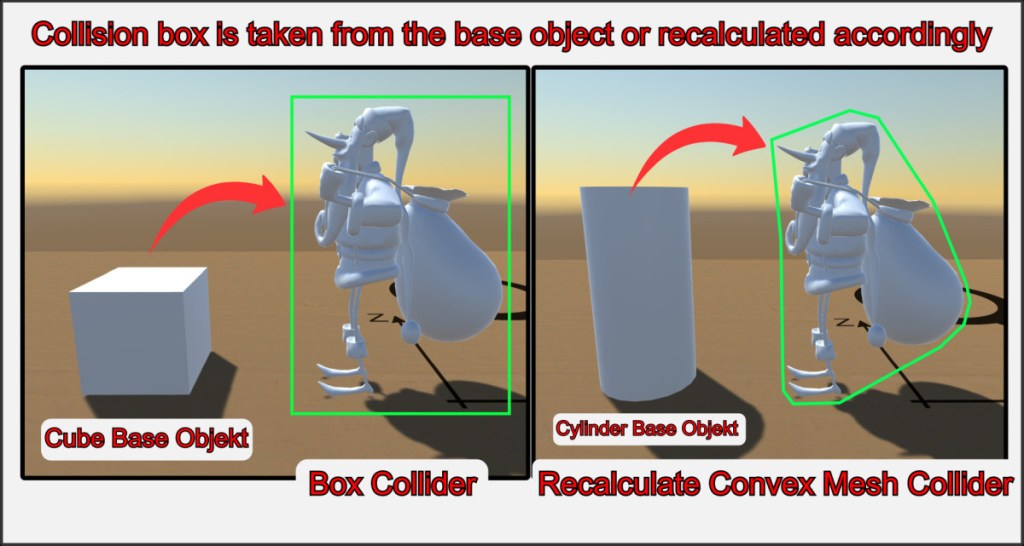
The collision hull of a custom object is always dependent on its original base object. Often you only need a simple collision hull, for which a simple rectangular box is quite suitable. This saves resources, loading times and generally makes the game more performant. Simply select the base cube as the carrier object.
Sometimes, however, you want the collision query to follow the enveloping 3D mesh. To achieve this, select the base cylinder as the carrier, for example. When importing, a new collision mesh is automatically calculated and used. Note that this collision box can only follow convex shapes. Convex is the default setting for the collision properties of objects.
Concave Hull
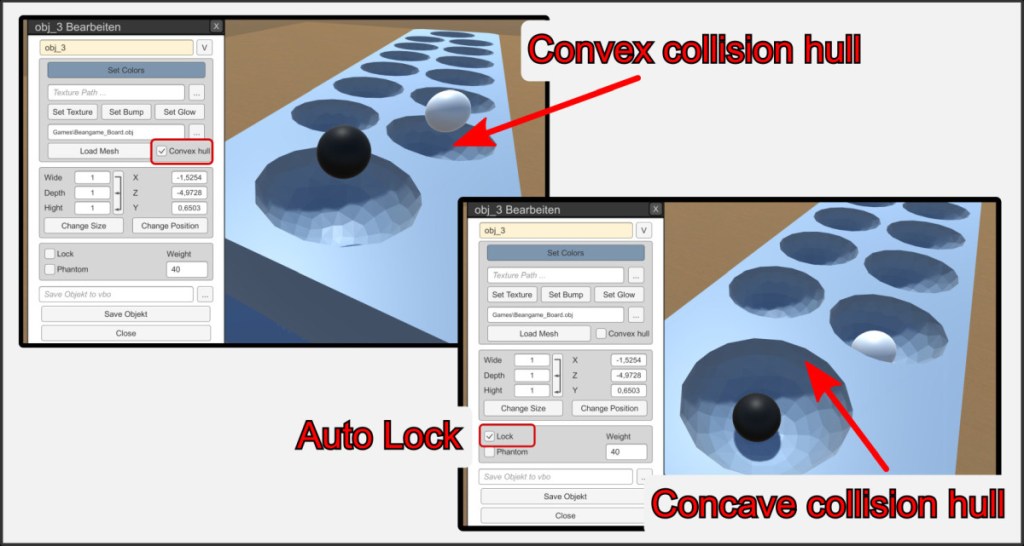
It is possible to give objects a concave collision hull. The collision is calculated pixel-precisely on the 3D mesh surface. This requires the most resources and has restrictions for the model. Only static objects can have a concave collision hull.
If the Convex hull option is switched off in the object properties, the object is automatically locked. If you open it again later, it automatically loses its concave collision properties. Concave objects are particularly suitable for complex 3D game boards, which are usually locked objects anyway.

